Once again I am back with a solution inspired by my fellow MVP Amey Holden. Here’s the challenge:
In a #MSDyn365 Marketing email, how do we show a list of one or more associated records connected to the recipient Contact AND filter those records to show just those that meet certain criteria? Let’s look at one way to accomplish this.
Tweet
With Dynamics 365 Marketing it is possible to add associated records in the body of an email using the Handlebars.js markup language. Microsoft has some good examples in their documentation here. For example, if you want to send a list of Appointments that are related to a Contact, you would use this code snippet:
<ul>
{{#each contact.appointment_contact_regardingobjectid}}
<li>
Subject: {{this.subject}} | Start Time: {{this.scheduledstart}} | Status: {{this.statecode}}
</li>
{{/each}}
</ul>
Tip: Before you can reference data in expressions like these, you need to make sure the entity is syncing to the Azure services behind Dynamics 365 Marketing. Under the Marketing app’s Settings area, locate the Dataset Configuration list and check the box(es) next to the entities you want to reference and publish your changes.
Also, if you add an entity for this purpose, you will need to update the security role “Marketing Services User” to permit it to at least “Read” the entity.
In my example above, a contact who has two open appointments and one closed appointment would receive an email that looks like this:
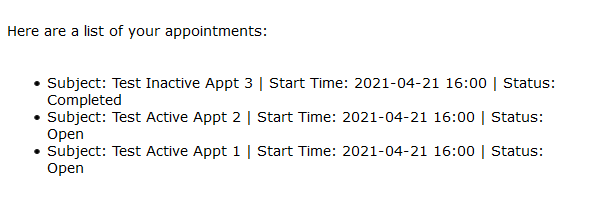
Notice that the first appointment is in the status of “Completed”. What if I only want to show the open appointments? What you’ll need to do is add a nested “if” statement inside the list to first check the status, and then, only if it meets the proper criteria, write it out in the body of the email.
One thing I learned is that even though the status gets written into the body of the email as the text value “Completed” or “Open”, the if/else logic is going to compare the index value. For the out-of-the-box activity status fields, 0 is the index value for Open. So here’s the code to list out only the open appointments:
{{#each contact.appointment_contact_regardingobjectid}}
{{#if (eq this.statecode 0)}}
Subject: {{this.subject}} | Start Time: {{this.scheduledstart}} | Status: {{this.statecode}}
{{/if}}
{{/each}}
The end result looks like this:

 Matt Wittemann
Dear Matt.
Do you know if there is a way to retrieve only the most recent item from a list of related records? I would like to send a list of session registrations to contacts who have registered for an event. But since experience tells us that people often change their mind, we allow the registration form to be submitted multiple time. But since each submission creates event registration and session registration records, the resulting email content contains duplicate and obsolete items. There doesn’t seem to be a way to return only the last and most recent event registration. Unless you know of a way?
Note that I’m not looking how to send the session list as a result of a submission/registration. For that I use the Event Registration created trigger, and that works great (it only returns the sessions for that specific event registration). But we’d like to send an email a few days prior to the event that shows only the most recent submission. Any ideas on how to achieve this would be much appreciated.
Thanks!
Joris
LikeLike
Hi Joris: You no longer need to write the script to get list data. You can do this in Real-time journeys in the email editor using the graphical UI where you can limit the number of list items that are returned. You should be able to limit it to just 1 item and sort it by the CreatedOn date (Descending):
LikeLike